

Answer

Payment Method after creating payment processor

  • September 22, 2024
  • 3 replies
  • 93 views

Forum|alt.badge.img

Hello, 
I’m creating a new payment plugin to do integration with cybersource,

I created the payment plugin and added the payment processor succssfully but the problem is that I can’t add a payment method linked to this new payment processor, please see attached images

  1. Under the processing center payment method tab, there is no payment methods
  2. when I go to fininace → payment methods and then add a new payment method I can’t find the new processing center under the payment method id

not sure what is missing? the acumatica docs are not helpful so I’m not sure why it doesn’t show any payment methods availabe, is there anything I miss to add to the payment plugin, thanks in advance
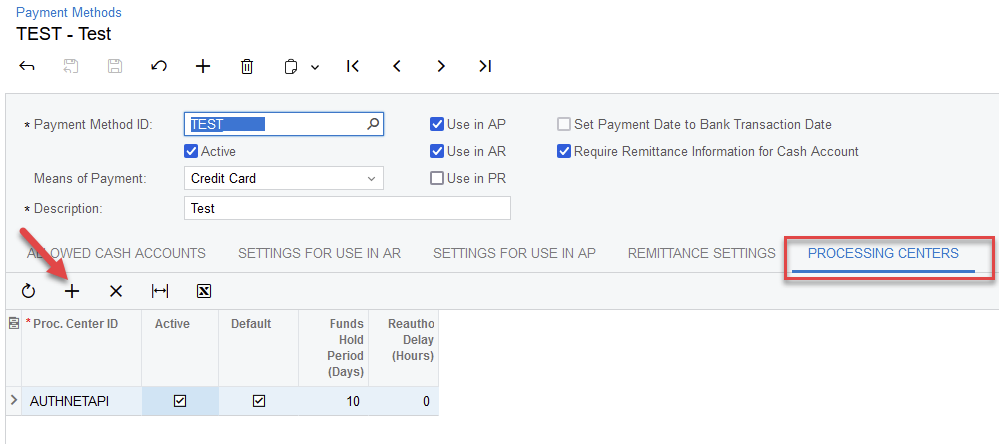

Best answer by hkabiri

@safetynetweb Select the Payment Method you want to add to your processing Center, go to Processing Center Tab and click + add the Active Processing Center you created and that should show up on your New Processing Center with New Payment Plugin.


3 replies

hkabiri
Acumatica Moderator
Forum|alt.badge.img+8
  • Acumatica Support Team
  • Answer
  • September 24, 2024

@safetynetweb Select the Payment Method you want to add to your processing Center, go to Processing Center Tab and click + add the Active Processing Center you created and that should show up on your New Processing Center with New Payment Plugin.


Forum|alt.badge.img
  • Author
  • Varsity III
  • September 24, 2024

@hkabiri 
thank you so much , this works! 

Is there any setup guide for development that can give me more details about the whole process of creation payment plugins with its different types, thanks again


Forum|alt.badge.img
  • Author
  • Varsity III
  • September 26, 2024

@hkabiri

The payment method was added, but it works as offline method , I created another topic with this question
