

Solved

Fetch User Define field Using Rest

  • October 15, 2024
  • 6 replies
  • 100 views

Forum|alt.badge.img+3

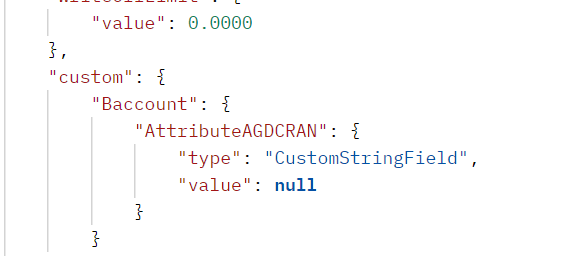
Hi, All. I am trying to get the UDF on customer screen using the GET in rest API. But the problem is the get call is returning the value null. Even the value is present in the UDF in UI. Any suggestion what should i do? 
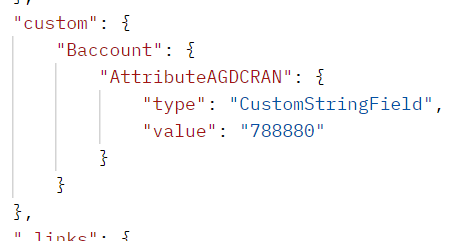
Secondly when I am trying PUT request with empty body there is a value in the custom dict.


Any one please help or guide me on how to over come this and what will be the best approach to fetch all udf values with customer id.

GET: http://localhost/entity/Default/22.200.001/Customer?$filter=CustomerID eq '000002'&$custom=Baccount.AttributeAGDCRAN
 

PUT: with same query
 

Best answer by Django

I’ve found the same thing that you are:

http://localhost/entity/Default/22.200.001/Customer?$filter=CustomerID eq '10017'&$select=CustomerID,CustomerName,CustomerClass&$custom=Baccount.AttributeAGDCREN

is returning NULL for the attribute.

But when I specify the customer’s URL, it works:

http://localhost/entity/Default/22.200.001/Customer/10017?$custom=Baccount.AttributeAGDCREN

So there appears to be something happening with the filter not picking up on the UDF.

Also, the NOTE-ID URL will find it properly as well.

6 replies

Naveen Boga
Captain II
Forum|alt.badge.img+19
  • Captain II
  • October 15, 2024

@tahayabali Can you please refer to the below link


Forum|alt.badge.img+3
  • Author
  • Captain I
  • October 15, 2024

@Naveen Boga  I am using the same GET call. But the custom dict value is null as mention in Screen shot above .

My query

http://localhost/entity/Default/22.200.001/Customer?$filter=CustomerID eq '0000028'&$custom=Baccount.AttributeAGDCRAN


Custom Dict.

"custom": {

            "Baccount": {

                "AttributeAGDCRAN": {

                    "type": "CustomStringField",

                    "value": null

                }

            }


Naveen Boga
Captain II
Forum|alt.badge.img+19
  • Captain II
  • October 15, 2024

@tahayabali I think you need to use the PUT query as per Acumatica help document.


Forum|alt.badge.img+3
  • Author
  • Captain I
  • October 15, 2024

Yes That’s what I am thinking too.


Naveen Boga
Captain II
Forum|alt.badge.img+19
  • Captain II
  • October 15, 2024

yes @tahayabali  That is they Acumatica is fetching the values with PUT.


Forum|alt.badge.img+7
  • Captain II
  • Answer
  • October 15, 2024

I’ve found the same thing that you are:

http://localhost/entity/Default/22.200.001/Customer?$filter=CustomerID eq '10017'&$select=CustomerID,CustomerName,CustomerClass&$custom=Baccount.AttributeAGDCREN

is returning NULL for the attribute.

But when I specify the customer’s URL, it works:

http://localhost/entity/Default/22.200.001/Customer/10017?$custom=Baccount.AttributeAGDCREN

So there appears to be something happening with the filter not picking up on the UDF.

Also, the NOTE-ID URL will find it properly as well.

