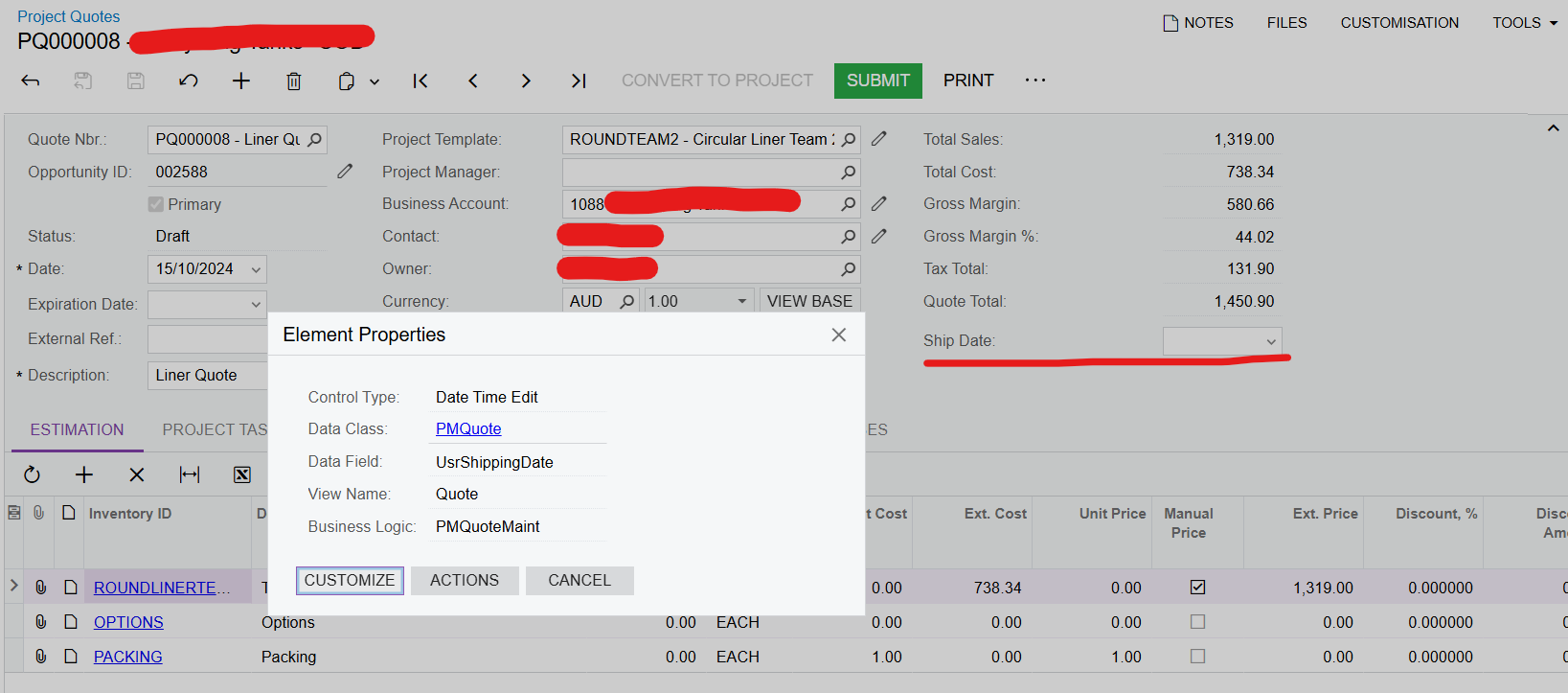
I have recently added a new custom Ship Date field to the Project Quotes screen, but I am finding that this field isn’t having its value persisted after saving and refreshing the screen.
Is there a property or piece of code I need to add in to ensure this new keeps its value?
Below is the code I have used to create the new field, as creating it via the usual method was producing the same non-persisting result.
Let me know if you need any other information.
Kind regards,
Andrew
namespace PX.Objects.PM
{
  public class PMQuoteExt : PXCacheExtension<PX.Objects.PM.PMQuote>
  {
    #region UsrShippingDate
    [PXDBDate]
    [PXUIField(DisplayName="Ship Date")]
    public virtual DateTime? UsrShippingDate{ get; set; }
    public abstract class usrShippingDate: PX.Data.BQL.BqlDateTime.Field<usrShippingDate> { }
    #endregion
  }
}
Best answer by jinin
Hi @AndrewA ,
The PMQuote DAC is a Projection DAC and is associated with the CRQuote DAC. So, if you add the field only in one DAC, it won't work. The field should be created on both sides, as shown below.
public class CRQuoteExt : PXCacheExtension<PX.Objects.CR.Standalone.CRQuote> { #region UsrShippingDate [PXDBDate] [PXUIField(DisplayName="ShippingDate")]
public virtual DateTime? UsrShippingDate { get; set; } public abstract class usrShippingDate : PX.Data.BQL.BqlDateTime.Field<usrShippingDate> { } #endregion }
public class PMQuoteExt : PXCacheExtension<PX.Objects.PM.PMQuote> { #region UsrShippingDate [PXDBDate(BqlField = typeof(CRQuoteExt.usrShippingDate))] [PXUIField(DisplayName="ShippingDate")] public virtual DateTime? UsrShippingDate { get; set; } public abstract class usrShippingDate : PX.Data.BQL.BqlDateTime.Field<usrShippingDate> { } #endregion }
The PMQuote DAC is a Projection DAC and is associated with the CRQuote DAC. So, if you add the field only in one DAC, it won't work. The field should be created on both sides, as shown below.
public class CRQuoteExt : PXCacheExtension<PX.Objects.CR.Standalone.CRQuote> { #region UsrShippingDate [PXDBDate] [PXUIField(DisplayName="ShippingDate")]
public virtual DateTime? UsrShippingDate { get; set; } public abstract class usrShippingDate : PX.Data.BQL.BqlDateTime.Field<usrShippingDate> { } #endregion }
public class PMQuoteExt : PXCacheExtension<PX.Objects.PM.PMQuote> { #region UsrShippingDate [PXDBDate(BqlField = typeof(CRQuoteExt.usrShippingDate))] [PXUIField(DisplayName="ShippingDate")] public virtual DateTime? UsrShippingDate { get; set; } public abstract class usrShippingDate : PX.Data.BQL.BqlDateTime.Field<usrShippingDate> { } #endregion }
Thanks for that Jini! The client has now decided they don’t want this field on the Project Quotes screen, but I have marked your comment as the answer for anyone else who runs into this issue.
I’m going to add to this discussion as I have a very similar requirement and applying this solution works as far as allowing the data to save properly, but this then breaks the DAC Schema Browser across all of the Acumatica tenant where it is deployed.
The client request was to add a customer selector filtered for a specific class of client. I’ve used the same field definition as the CRQuoteExt code below on the Projects screen and it is working perfectly.
I created the following extensions:
    // Acuminator disable once PX1016 ExtensionDoesNotDeclareIsActiveMethod extension should be constantly active
    public class CRQuoteExt : PXCacheExtension<PX.Objects.CR.Standalone.CRQuote>
    {
        #region UsrSite
        [PXRestrictor(typeof(Where<Customer.customerClassID, Contains<siteCustClass>>), Messages.NotSite)]
        [Customer]
        [PXUIField(DisplayName = "Site")]

        public virtual int? UsrSite { get; set; }
        public abstract class usrSite : PX.Data.BQL.BqlInt.Field<usrSite> { }
        #endregion
    }

    // Acuminator disable once PX1016 ExtensionDoesNotDeclareIsActiveMethod extension should be constantly active
    public class PMQuoteExt : PXCacheExtension<PX.Objects.PM.PMQuote>
    {
        #region UsrSite
        [PXRestrictor(typeof(Where<Customer.customerClassID, Contains<siteCustClass>>), Messages.NotSite)]
        [Customer(BqlField = typeof(CRQuoteExt.usrSite))]
        //[Customer]
        [PXUIField(DisplayName = "Site")]

        public virtual int? UsrSite { get; set; }
        public abstract class usrSite : PX.Data.BQL.BqlInt.Field<usrSite> { }
        #endregion
    }
When I publish this, I’m able to add the UsrSite field to the Project Quote screen, and can save data to the field successfully, but the DAC Schema Browser no longer loads for any page on this tenant, instead displaying the following message:
No description of the DAC has been found
Probably, the DAC has been removed, or the customization project containing this DAC has been unpublished
If I comment out these extensions and republish the customization, the DAC Schema Browser works again on all other pages. This appears to potentially be related to the field data type being set to Customer instead of PXDBInt (I tried this same type of extension as a simple Int field and the DAC seems to keep working in that case).
Any suggestions on how to implement this type of extension without breaking the DAC Browser?