Answer

2023R2 Manufacturing versionPre Billing - Pre Invoicing - Progress Billing

  • October 17, 2025
  • 8 replies
  • 70 views

Forum|alt.badge.img

We are a manufacturing company using 2023R2 and we are trying to find a process where we can pre invoice some of our clients before we ship the product. 


Best answer by PaulMainard55

@ldjmarcog - I agree that having a configurable payment schedule (as opposed to payment terms) to collect order prepayments would be a good thing.  In fact, I think there have been some folks, including myself, that have added this to the ideas forum.  Here’s a link to one of the ideas so you can upvote it as an enhancement to the system.

Installment Invoices before shipping Product | Community

In the meantime, here’s something you can try:

You can create an Order Type based on the QT behavior.  You can use this order type, which is non-posting and non-fulfillable, to produce invoices to collect a prepayment.  Depending on how you label this order type, you can produce it in such a way that it appears as an invoice to your customer, but the invoice itself will neither post to AR or the GL.  To tie it together, you can copy the sales order to the prepayment quote order and the system should maintain a cross-reference for you.  You could incorporate user defined fields to identify that the document was generated to collect the prepayment and whether the money has been received.  When the cash is received, you still have the ability to apply it as a prepayment to the Sales Order so you know you can release the order for production and shipment.  

I like this approach because you need to allow the system generate an actual invoice when the goods are shipped.  It still gives you the ability to leverage Acumatica’s tool that will apply the prepayments to your final invoice that will be generated after shipment.  

It’s not a perfect solution and agree that we need some tools that will better support these requirements, like generating a payment schedule and a semi-automated way to generate the payment requests.  In the meantime, this could offer something to help you until a better solution comes along..  

8 replies

PaulMainard55
Captain I
Forum|alt.badge.img+2

Hi ​@ldjmarcog 

Are you an Engineer to Order company where you have long-term manufacturing projects where you are generating milestone invoices?  Do you have Project Accounting?

You can generate progress billing using the project accounting module, but this can lead to other complications depending on your revenue recognition requirements, if this concept is important to you.  

Also, when you receive the monies, are you thinking that you want to record the customers’ payments as “Prepayments” that you can apply to a final invoice once the goods are shipped?

If you don’t have project accounting but are interested in progress billing, use your universal search to find the help article associated with Progress Billings to learn more about this feature.  In the meantime, if you want to provide additional information about your current process and licensing, that would be helpful as well.  


Forum|alt.badge.img
  • Author
  • Jr Varsity III
  • October 20, 2025

@PaulMainard55

“Are you an Engineer to Order company where you have long-term manufacturing projects where you are generating milestone invoices?”  Nope.

“Do you have Project Accounting?” Nope.

“are you thinking that you want to record the customers’ payments as “Prepayments” that you can apply to a final invoice once the goods are shipped?” We want to produce an invoice that we can send a customer, for payment.  Once payment is received, we would release sales order for shipment.

We simply want to produce an invoice for a sales order before goods are shipped.  Other ERP systems that I worked with have “Progress Billing” which could be configured in different ways producing invoices (by % or Date milestones), halting shipment until payment is received.  One of them was to produce an invoice for 100% of sales order total before production or before shipment, this option would produce an invoice when the sales order was completed, the user would get a message when saving sales order asking if the user wanted to print/email invoice.  

We do Prepayment for smaller product, but our main product is high value, and some customers request invoices.


PaulMainard55
Captain I
Forum|alt.badge.img+2
  • Captain I
  • Answer
  • October 20, 2025

@ldjmarcog - I agree that having a configurable payment schedule (as opposed to payment terms) to collect order prepayments would be a good thing.  In fact, I think there have been some folks, including myself, that have added this to the ideas forum.  Here’s a link to one of the ideas so you can upvote it as an enhancement to the system.

Installment Invoices before shipping Product | Community

In the meantime, here’s something you can try:

You can create an Order Type based on the QT behavior.  You can use this order type, which is non-posting and non-fulfillable, to produce invoices to collect a prepayment.  Depending on how you label this order type, you can produce it in such a way that it appears as an invoice to your customer, but the invoice itself will neither post to AR or the GL.  To tie it together, you can copy the sales order to the prepayment quote order and the system should maintain a cross-reference for you.  You could incorporate user defined fields to identify that the document was generated to collect the prepayment and whether the money has been received.  When the cash is received, you still have the ability to apply it as a prepayment to the Sales Order so you know you can release the order for production and shipment.  

I like this approach because you need to allow the system generate an actual invoice when the goods are shipped.  It still gives you the ability to leverage Acumatica’s tool that will apply the prepayments to your final invoice that will be generated after shipment.  

It’s not a perfect solution and agree that we need some tools that will better support these requirements, like generating a payment schedule and a semi-automated way to generate the payment requests.  In the meantime, this could offer something to help you until a better solution comes along..  


Forum|alt.badge.img
  • Author
  • Jr Varsity III
  • October 20, 2025

@PaulMainard55 Thank you, I’ll go over this process, test it out and review with team.


  • Freshman I
  • November 14, 2025

We are 2024 R2 still, but I would presume it would still be similar.

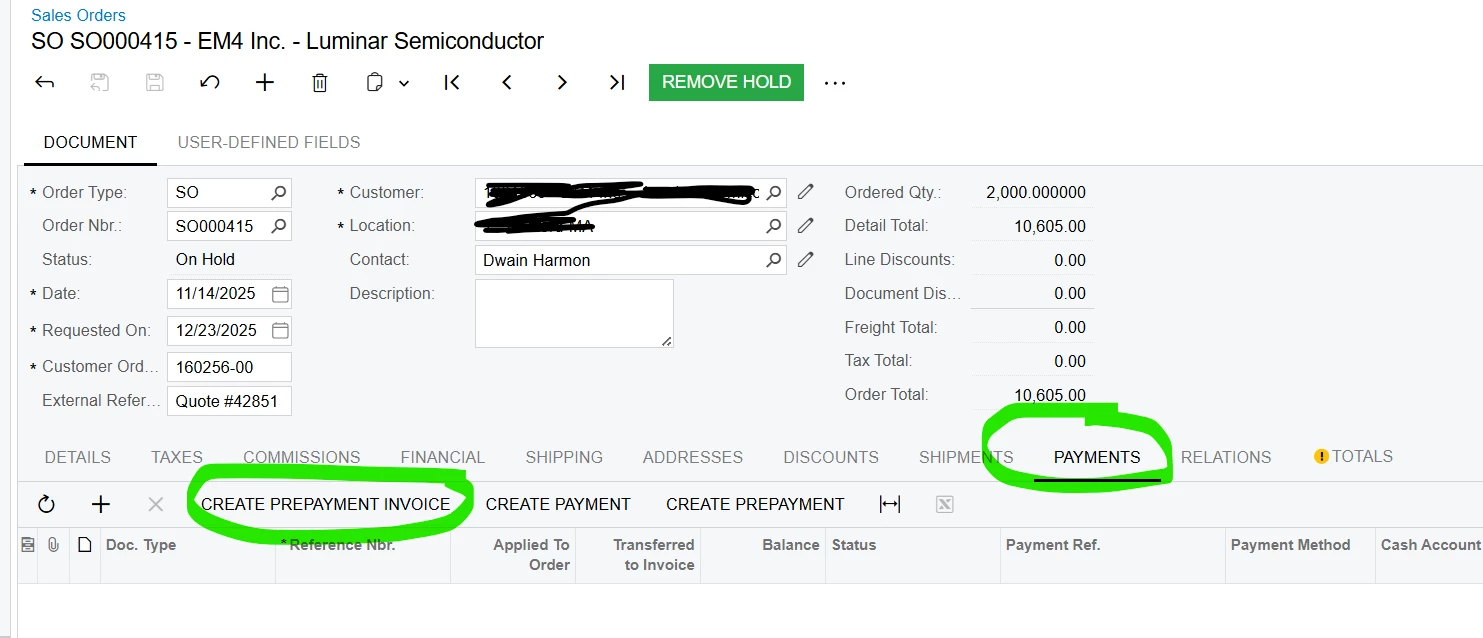
On the Sale Order - go to the payments tab, then Create Prepayment Invoice.

You also post your payment receipt  here as well.


Forum|alt.badge.img
  • Author
  • Jr Varsity III
  • November 14, 2025

@ccharris01 Thank you!  I don’t see that as an option in 2023R2 but, we’ll be upgrading here in a couple of months and will keep an eye out for this.


PaulMainard55
Captain I
Forum|alt.badge.img+2

We are 2024 R2 still, but I would presume it would still be similar.

On the Sale Order - go to the payments tab, then Create Prepayment Invoice.

You also post your payment receipt  here as well.


@ccharris01 & ​@ldjmarcog  -  this would be a great solution, but users need to be aware of the configuration requirements and system limitations allowing this to work. I recently dove deeply into this a few weeks ago for a project I’m working on and my enthusiasm for this feature has been dampened.

I recently spoke with the Financial Product managers about this to meet another client’s requirements. 

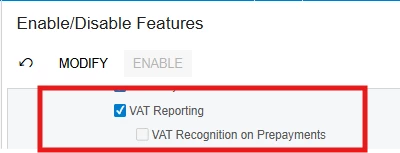
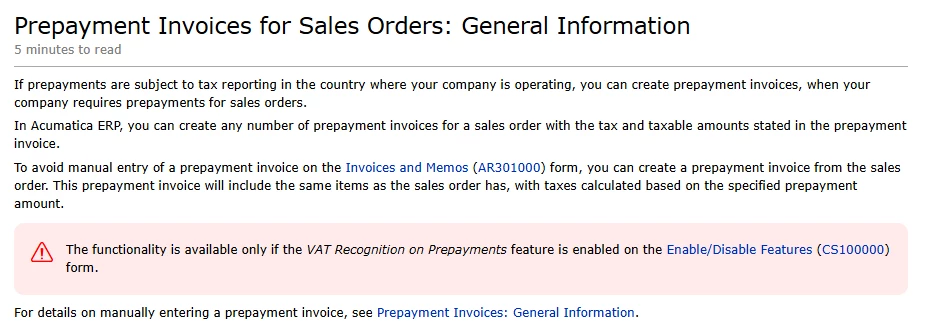
The problem with this, per the help wiki, is that VAT Reporting and VAT Recognition on Prepayments has to be enabled in order for the Create Prepayments Invoice option to be made available on the Sales Order screen (see below).  This complicates the ability for US-based users to leverage this feature. 


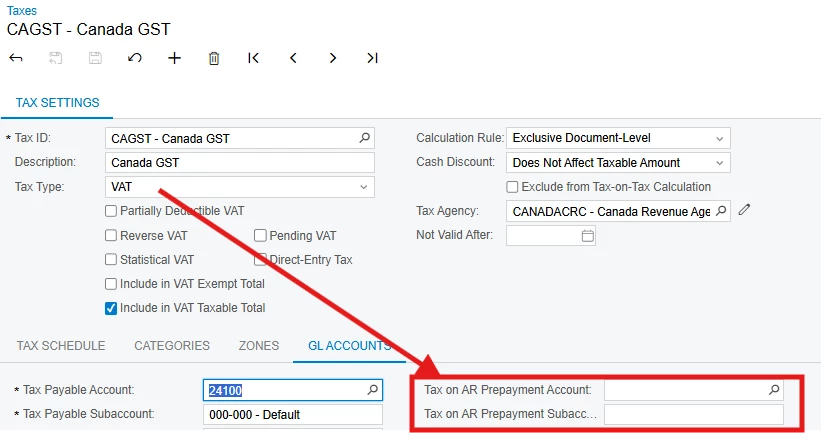
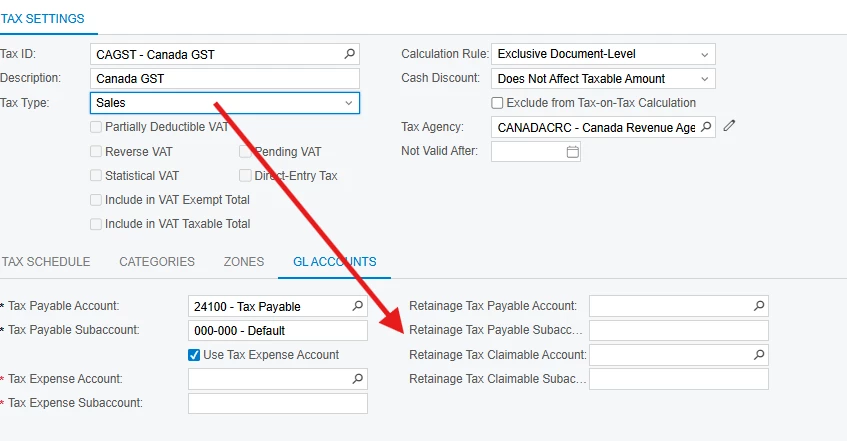
Other community members, including myself, have tested this.  There’s a required account mapping prompt in the Taxes screen to record the tax liability for prepayments, but they are only available for VAT tax type codes. They are not available in the Tax Agency Settings (AP Vendor master record), nor are they available for “Sales” tax codes.


If a tax code is invoked and these settings are not configured the system will throw an error when the Prepayment Invoice is released.

If the Tax Code is set to Sales tax, these prompts disappear and cannot be configured.  If a sales tax is invoked while trying to release an AR Prepayment Invoice, the system throws an error.  


Now - it’s possible to configure the tax code initially as a VAT tax, and set the Tax on AR Prepayment accounts, then reset the Tax Code to sales.  My testing indicates that this is a suitable work-around.  

If the user is using Avalara, we expect, but are unsure, that Acumatica will throw an error when posting the prepayment invoice. Under this scenario, no tax code is invoked within Acumatica, but the lack of a Tax on AR Prepayments prompt at the Tax Agency level, may very likely cause an error.  This is because of the underlying logic being used during the posting process of Prepayment Invoices.  

I applaud the guidance on the availability of this solution, but users should be made aware of the potential pitfals of invoking this feature.  


Forum|alt.badge.img
  • Author
  • Jr Varsity III
  • November 17, 2025

@PaulMainard55 Appreciate the input.  I was going to say, I don’t see the options in 2025R1, which we are currently testing.